
More Security. More Control. Instant Card Access.
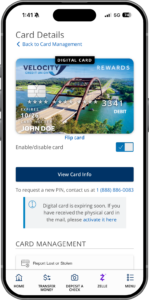
Card Management gives you the power to protect your cards anytime, anywhere. Quickly turn cards on or off, get notified of activity, report lost or stolen cards and get a digital replacement card to use in your digital wallet in seconds—all from the convenience of online banking and the Velocity mobile app.
Esta aplicación ofrece una forma cómoda de:
- View recent, pending transactions and account details
- Lock or unlock your card
- Reporta una tarjeta perdida o robada
- Add your card to your digital wallet
- Establecer alertas y controles
- Notificaciones de viaje y mucho más
Digital Cards & Mobile Wallets
Get Access to Your Card Faster
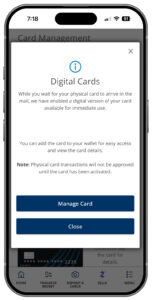
Eligible Velocity debit and credit cards can be added to supported mobile wallets, helping you pay securely using your mobile device.
Digital card access makes it easier to:
- Start using a newly issued card sooner
- Continue making purchases while waiting for a replacement card
- Add eligible cards to supported mobile wallets
- Keep your card available when your physical card isn’t nearby
Mobile Wallet Benefits
Pay quickly and securely at millions of participating merchants.
Supported wallet options may include:
- Apple Wallet®
- Google Wallet™
Using a digital wallet helps reduce the need to carry a physical card while adding additional device-level security protections.
Instant Card Access with Digital Cards
There’s no need to wait for your physical card! With Velocity’s Digital Cards, you can instantly access your new or replacement debit or credit card for online purchases. Add it to Apple Wallet or Google Wallet through mobile banking for convenient purchases in stores or online. No waiting, no branch visits—just easy access when you need it.
View Card Information
Your card details are just a few taps away. Follow the steps below to securely view them in Digital Banking.
- Log into digital banking
- Select Wallet then Card Management
- Select the card and click View Card Info
- Complete the authentication process to view your card info
Protect Yourself from Fraud
Velocity will never call and ask for your card number, PIN, or other confidential account information. If you receive a suspicious request, do not share your information. If you suspect fraud or believe you’ve been a victim, contact our Member Contact Center immediately at 512.469.7000.
Add Your Card to Your Digital Wallet
Make purchases anytime and anywhere with your phone and your digital wallet. Adding your Velocity debit and credit card to the mobile wallet on your phone is fast and simple.
- Use your mobile device to log into digital banking
- Select Wallet then Card Management
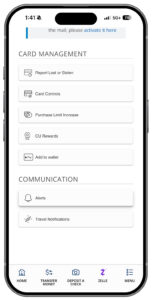
- Select the card and click Add to wallet
- Compete the steps, accept the terms and set the card as the default card for your digital wallet
- You’re ready to start using your Velocity card for those everyday purchases
Replace Your Card
If your card is lost or stolen, close it within digital banking and get a digital replacement card to begin using immediately.
- Log into digital banking
- Select Wallet then Card Management
- Select Report Lost or Stolen
- Complete the questionnaire
- Your replacement digital card will appear in digital banking
- Add the new card to your digital wallet
Card Management – FAQs
-
Do you work with Apple Pay, Google Pay, and Samsung Pay?
-
Yes. Velocity debit and credit cards work with supported digital wallets, making it easy to pay securely from your mobile device.
With our digital card features, eligible cards can also be accessed through Card Management and added to Apple Pay and Google Pay.
Find Card Management under the Wallet menu or Quick Links in Velocity Digital Banking.
Never share a mobile wallet verification or enrollment code. If you suspect unauthorized wallet activity, call 512.469.7000.
-
What is Card Management?
-
Card Management lets you access, protect, and manage your Velocity debit and credit cards from Online or Mobile Banking.
Use Card Management to:
- Access eligible cards digitally and add them to Apple Pay and Google Pay
- Lock or unlock a card
- Manage alerts and controls
- Activate a new card
- Reporta una tarjeta perdida o robada
- Set travel notifications
Find Card Management under the Wallet menu or Quick Links in Velocity Digital Banking.
-
How does Velocity handle card fraud alerts?
-
Velocity monitors card activity 24/7 for potential fraud. If suspicious activity is detected, you may receive a text from 72488 or 49447 or a call from the Fraud Detection Department at 877-401-6770 or 727.299.2449 asking you to verify a transaction.
You can also use Card Management to review transactions, lock a misplaced card, report a lost or stolen card, and access eligible replacement cards digitally.
If you believe your card has been compromised or blocked, call Velocity at 512.469.7000.
-
Where can I find Card Management?
-
Find Card Management in Velocity online and mobile banking under the Wallet menu.
-
What can I do in Card Management?
-
In Card Management you can enroll in alerts and controls, activate a card, set up a travel notification, view card information, report a card lost or stolen and more.
-
What are Card Controls?
-
Card Controls allow you to disable and enable your card for security, decline specific transaction types or merchant types and set spending limits.
-
Will my recurring payments on my card get declined if I disable it?
-
No, disabling your debit or credit card does not prevent recurring payments from getting approved.
-
What is a digital card and digital wallet?
-
A digital card can be added to your digital wallet, such as Apple Pay or Google Pay, while you wait for your physical card to arrive in the mail. Use your digit wallet with your Velocity debit or credit card for in person or online transactions.
-
How do I get a digital card?
-
For a replacement debit or credit card, use the Report Lost or Stolen feature within Card Management and get access to your digital card immediately.
A new debit or credit card will be available as a digital card within 1-2 business days once ordered.